 Part3D Bridge
From model to slicer
in one tap.
A lightweight desktop helper that connects Part3D on iPad to Orca Slicer, Bambu Studio, Creality Print, and more — no cables, no cloud, no IP addresses.
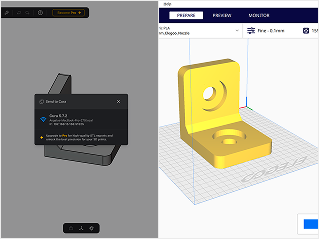
Three steps. Zero config.
Download & run Bridge
Install the tiny helper on your Mac, Windows, or Linux machine. It sits in the system tray and waits silently.
Same Wi-Fi network
Keep your iPad and computer on the same network. Bridge announces itself via mDNS — no IP addresses to type.
Tap Send to Slicer
Hit Send to Slicer in Part3D, approve the one-time pairing prompt, and your STL lands straight in your slicer.
Built to be invisible.
Lightweight, secure, and automatic. Bridge does its job without getting in your way.
Auto-discovery
iPad finds the Bridge automatically on your network via mDNS/Bonjour — no manual setup.
One-click import
Send STL files from Part3D on iPad directly to your slicer with a single tap.
Secure pairing
First-time device approval with HMAC authentication so only your devices can connect.
Smart detection
Bridge automatically finds installed slicers on your system.
Lightweight
Under 10 MB binary, under 15 MB RAM. Runs quietly without slowing your machine.
System tray
Runs in the background with a tray icon — no window clutter.